

Photoshop Challenge Week #1
| Posted By | Message |
|---|---|
|
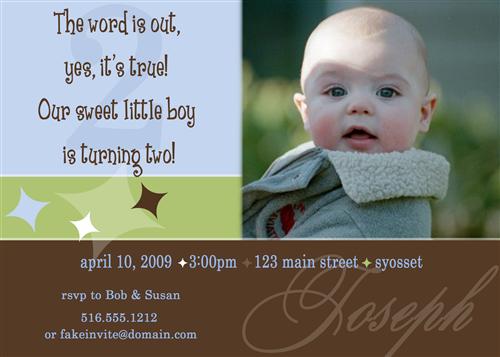
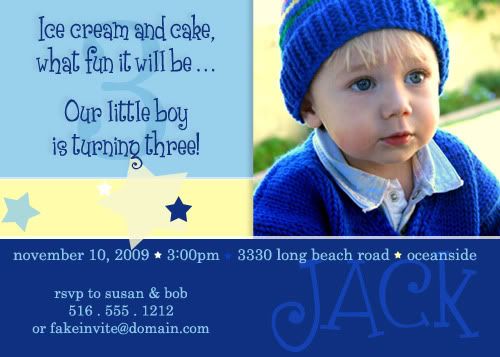
Photoshop Challenge Week #1 Your task this week is to copy the invitation below: |
|
Posted 8/24/09 11:56 AM 
|
|
|
Long Island Weddings
Long Island's Largest Bridal Resource
| |
|
dooodles
Member since 5/05 11997 total posts Name: |
Re: Photoshop Challenge Week #1 Yay! Another challenge - I love these! |
|
Posted 8/24/09 12:40 PM
|
|
|
Re: Photoshop Challenge Week #1 Awesome! Thanks, Barb! Is there a due date?? |
|
|
Posted 8/24/09 4:06 PM
|
|
|
Re: Photoshop Challenge Week #1 We'll make the due date Sept 4th (so it's a 2 week challenge because I'll be off the board). |
|
|
Posted 8/24/09 4:22 PM
|
|
|
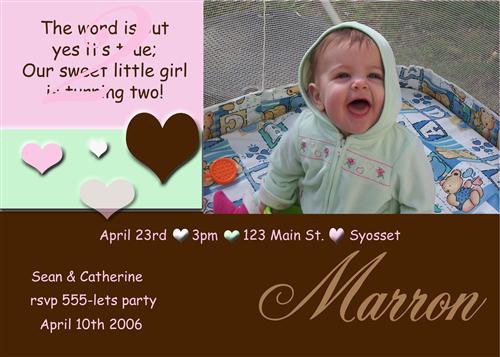
Re: Photoshop Challenge Week #1 OK...this was my first try. Im not sure if we are supposed to copy exactly...but I put in DDs pic and changed the background. I dont know how to download the font...it keeps saving to documents. How do I get it into fonts? Then I changed the shapes because I have no diamonds. Being that she napped for 20 min Message edited 2009-08-24 16:37:44.893000. |
|
|
Posted 8/24/09 4:35 PM
|
|
|
Re: Photoshop Challenge Week #1 Posted by pixie OK...this was my first try. Im not sure if we are supposed to copy exactly...but I put in DDs pic and changed the background. I dont know how to download the font...it keeps saving to documents. How do I get it into fonts? Then I changed the shapes because I have no diamonds. Being that she napped for 20 min  Im done. I know its way off...but I tried!!  So cute! I love the colors you chose.... and the picture is adorable! 
|
|
|
Posted 8/24/09 9:01 PM
|
|
|
Re: Photoshop Challenge Week #1 Here's my attempt. My diamonds are not quite right, but all in all I am pretty happy with it. Message edited 2009-08-24 21:05:10.210000. |
|
|
Posted 8/24/09 9:02 PM
|
|
|
Re: Photoshop Challenge Week #1 OK, here's my go at it. I wasn't sure if yours had white lines, or if it was a highlight. Message edited 2009-08-25 09:08:39.590000. |
|
|
Posted 8/24/09 9:23 PM
|
|
|
Re: Photoshop Challenge Week #1 They all look great! 
Message edited 2009-08-24 22:28:26.130000. |
|
|
Posted 8/24/09 10:14 PM
|
|
|
Re: Photoshop Challenge Week #1 How did everyone get it so PERFECT!!! I love them all!!! I obviously need another class |
|
|
Posted 8/24/09 10:54 PM
|
|
|
Re: Photoshop Challenge Week #1 I'm so sorry I couldn't make the class....I had to work |
|
|
Posted 8/25/09 8:23 AM
|
|
|
Re: Photoshop Challenge Week #1 Wow, GREAT job - EVERYONE! |
|
|
Posted 8/25/09 8:39 AM
|
|
|
Re: Photoshop Challenge Week #1 Posted by pixie I dont know how to download the font...it keeps saving to documents. How do I get it into fonts? I just started a new thread in case anyone else is looking for it: How to install fonts Posted by NinaLemon I wasn't sure if yours had white lines, or if it was a highlight. Mine was a white stroke & then I reduced the opacity on it to fade it a little. There are a thousand ways to do the same thing in photoshop. Do whatever you find the easiest. Message edited 2009-08-25 10:18:32.350000. |
|
|
Posted 8/25/09 10:06 AM
|
|
|
Re: Photoshop Challenge Week #1 They look great! When I went to the class it is the first time I really learned how to do anything in Photoshop so I am FAR from ready to make those cute invites. Message edited 2009-08-26 14:20:02.630000. |
|
|
Posted 8/26/09 2:15 PM
|
|
|
Re: Photoshop Challenge Week #1 Great job but you skewed the photo in the last one. Make sure you are holding down the shift key & that the width & height numbers stay the same when you're resizing. |
|
|
Posted 8/26/09 8:19 PM
|
|
|
Re: Photoshop Challenge Week #1 i had a million and one layers LOL and that many mistakes but this is the final product Image Attachment(s):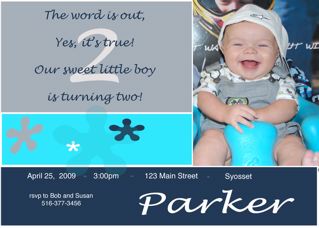
Message edited 2009-08-27 23:08:09.490000. |
|
|
Posted 8/27/09 11:05 PM
|
|
|
Re: Photoshop Challenge Week #1 On Elements, holding the shift key isn't working...it still skews it. |
|
|
Posted 8/28/09 12:13 PM
|
|
|
Re: Photoshop Challenge Week #1 Posted by 2003fallwedding On Elements, holding the shift key isn't working...it still skews it. I can't figure out how to do the box with the white edging (not the picture) and a new different color it in... Tracy, When you are sizing the pic, make sure you have the box for "constrain properties" checked. This will keep it looking proportional. I also can't figure out how to do the white lines around the box. I can help you with the different colors on the invite. I can't however figure out how to get the 4 diamonds on the card. Lets get together and figure this all out. Maybe 2 heads are better than 1. |
|
|
Posted 8/29/09 2:16 AM
|
|
|
Re: Photoshop Challenge Week #1 Posted by pharmcat2000 Posted by 2003fallwedding On Elements, holding the shift key isn't working...it still skews it. I can't figure out how to do the box with the white edging (not the picture) and a new different color it in... Tracy, When you are sizing the pic, make sure you have the box for "constrain properties" checked. This will keep it looking proportional. I also can't figure out how to do the white lines around the box. I can help you with the different colors on the invite. I can't however figure out how to get the 4 diamonds on the card. Lets get together and figure this all out. Maybe 2 heads are better than 1. You need to add a white stroke on the layer with the rectangle shape. Then you reduce the opacity (which is located on the toolbar with the layer palette) |
|
|
Posted 8/30/09 10:52 PM
|
|
|
Re: Photoshop Challenge Week #1 Anybody using Photoshop Elements? Were you able to save the custom shape or font? I can't seem to find the button to load the shape. |
|
|
Posted 9/1/09 8:35 AM
|
|
|
Re: Photoshop Challenge Week #1 Posted by pharmcat2000 Anybody using Photoshop Elements? Were you able to save the custom shape or font? I can't seem to find the button to load the shape. http://graphicssoft.about.com/od/photoshop/qt/installcontent.htm |
|
|
Posted 9/7/09 4:25 PM
|
|
|
Re: Photoshop Challenge Week #1 Not my kid! 
Message edited 2009-09-13 19:59:40.397000. |
|
|
Posted 9/13/09 7:59 PM
|
|
|
Re: Photoshop Challenge Week #1 Here is my feeble attempt: Message edited 2009-09-27 12:49:22.943000. |
|
|
Posted 9/27/09 12:46 PM
|
|
|
Re: Photoshop Challenge Week #1 I know this is an old post, but I wanted to play too ... figure it can't hurt to try it out. |
|
|
Posted 11/3/09 9:52 PM
|
|
|
Re: Photoshop Challenge Week #1 Wow! So proud of everyone! |
|
|
Posted 11/3/09 10:08 PM
|
|











Potentially Related Topics:
| Topic | Posted By | Started | Replies | Forum |
|---|---|---|---|---|
| X-post Free Ballys 8 week pass - 2008 National Body Challenge | riniko | 1/2/08 | 1 | Families Helping Families ™ |
| Free Ballys 8 week pass - 2008 National Body Challenge | riniko | 1/2/08 | 3 | Diet & Fitness |
| My first challenge....help WW food planning for the week | HarleyGirlFLA | 1/1/07 | 2 | Diet & Fitness |
| Hot Holiday Moms Challenge-Week One Check in Thread | monkeybride | 9/5/06 | 74 | Parenting |
| 2 Photoshop questions...need help | leap29 | 2/13/06 | 3 | Families Helping Families ™ |
| Another Mariah shot (this SHOULD HAVE BEEN photoshop'd!) | Lichi | 1/31/06 | 35 | Families Helping Families ™ |