You must first be logged in to post a new topic.
If you are not registered, please click "Create Account".
| Posted By |
Message |
pharmcat2000
Mom of 2 + 1

Member since 10/05 7395 total posts
Name:
Catherine
|
Opinions on this 1st b-day invite - changes made
Here is what I've worked on. I know it isn't perfect, or as good as a lot of moms here can do, but it is going to have to be good enough since I want to get them out ASAP as the party is in just a couple of weeks.
Any suggestions of things I can do quick and easy to make it better i.e. background color, font color/type/size or placement of things? Any other suggestions?
TIA!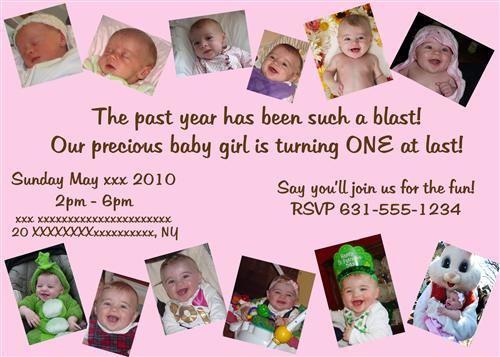
Message edited 4/9/2010 12:42:12 PM.
|
Posted 4/8/10 5:09 PM  |
| |
|
Long Island Weddings
Long Island's Largest Bridal Resource |
eroxgirl
My Loves

Member since 5/05 15697 total posts
Name:
Rebecca
|
Re: Opinions on this 1st b-day invite
If you know how to add drop shadows, I would do that to each of the pictures. Just a little to give it some dimension.
I'd also move the date of the party over a bit. There's a little too much space in between that paragraph and the RSVP section... I would have those two sections line up under the beginning sentences - meaning start where it starts, end where it ends.
Lastly, I think I would add a thin border around the whole thing in the same color as the font just to tie the whole thing together.
Nice invite! 
|
| Posted 4/8/10 5:21 PM |
| |
|
pharmcat2000
Mom of 2 + 1
Member since 10/05 7395 total posts
Name:
Catherine
|
Re: Opinions on this 1st b-day invite
Thanks for the suggestions. I'm going to try to do them.
|
| Posted 4/8/10 5:33 PM |
| |
|
pharmcat2000
Mom of 2 + 1
Member since 10/05 7395 total posts
Name:
Catherine
|
Re: Opinions on this 1st b-day invite
Posted by pharmcat2000
Thanks for the suggestions. I'm going to try to do them.
OK how do I do the drop shadow? When I'm trying to do it around the pic, it is putting it around the whole invite.
|
| Posted 4/8/10 5:37 PM |
| |
|
pharmcat2000
Mom of 2 + 1
Member since 10/05 7395 total posts
Name:
Catherine
|
Re: Opinions on this 1st b-day invite
Posted by pharmcat2000
Posted by pharmcat2000
Thanks for the suggestions. I'm going to try to do them.
OK how do I do the drop shadow? When I'm trying to do it around the pic, it is putting it around the whole invite.
OK...and how do I put the border around the whole invite...it keeps ending up in the middle of the invite.
|
| Posted 4/8/10 5:38 PM |
| |
|
eroxgirl
My Loves
Member since 5/05 15697 total posts
Name:
Rebecca
|
Re: Opinions on this 1st b-day invite
I'm still fuzzy in photosphop because I only just started using it, but I can probably figure it out quickly. I'm leaving work now but when I get home I can help you with that. (ets: I was referring to the drop shadows here)
And the border is a personal preference - I'm kind of addicted to them  so if you don't like how it looks don't do it. But I know how to do that off the top of my head - select the pink layer and add a stroke around it. That will put it on that layer only. so if you don't like how it looks don't do it. But I know how to do that off the top of my head - select the pink layer and add a stroke around it. That will put it on that layer only.
Message edited 4/8/2010 5:44:59 PM.
|
| Posted 4/8/10 5:44 PM |
| |
|
LoriH
There's no place like home

Member since 8/07 4110 total posts
Name:
Lori
|
Re: Opinions on this 1st b-day invite
You have to add effects like drop shadow to each layer. When working in photoshop with many layers the most important thing to do is make sure you have the correct layer selected when making changes.
|
| Posted 4/8/10 5:48 PM |
| |
|
pharmcat2000
Mom of 2 + 1
Member since 10/05 7395 total posts
Name:
Catherine
|
Re: Opinions on this 1st b-day invite
Posted by eroxgirl
I'm still fuzzy in photosphop because I only just started using it, but I can probably figure it out quickly. I'm leaving work now but when I get home I can help you with that. (ets: I was referring to the drop shadows here)
And the border is a personal preference - I'm kind of addicted to them so if you don't like how it looks don't do it. But I know how to do that off the top of my head - select the pink layer and add a stroke around it. That will put it on that layer only.
I did the white border around each pic using the stroke selection. But it won't put a brown border around the whole invite. The pink part is the background...maybe that is why? I see what you mean about incorporating the brown some other way...is there something else I can do instead? Maybe some brown and white polka dots? Or will that be too busy?
|
| Posted 4/8/10 5:57 PM |
| |
|
LoriH
There's no place like home
Member since 8/07 4110 total posts
Name:
Lori
|
Re: Opinions on this 1st b-day invite
Posted by pharmcat2000
Posted by eroxgirl
I'm still fuzzy in photosphop because I only just started using it, but I can probably figure it out quickly. I'm leaving work now but when I get home I can help you with that. (ets: I was referring to the drop shadows here)
And the border is a personal preference - I'm kind of addicted to them so if you don't like how it looks don't do it. But I know how to do that off the top of my head - select the pink layer and add a stroke around it. That will put it on that layer only.
I did the white border around each pic using the stroke selection. But it won't put a brown border around the whole invite. The pink part is the background...maybe that is why? I see what you mean about incorporating the brown some other way...is there something else I can do instead? Maybe some brown and white polka dots? Or will that be too busy?
If the background is locked, photshop will not let you do certain edits to it. Create a duplicate layer from the background and add the effect to that.
|
| Posted 4/8/10 6:01 PM |
| |
|
pharmcat2000
Mom of 2 + 1
Member since 10/05 7395 total posts
Name:
Catherine
|
Re: Opinions on this 1st b-day invite
Posted by LoriH
Posted by pharmcat2000
Posted by eroxgirl
I'm still fuzzy in photosphop because I only just started using it, but I can probably figure it out quickly. I'm leaving work now but when I get home I can help you with that. (ets: I was referring to the drop shadows here)
And the border is a personal preference - I'm kind of addicted to them so if you don't like how it looks don't do it. But I know how to do that off the top of my head - select the pink layer and add a stroke around it. That will put it on that layer only.
I did the white border around each pic using the stroke selection. But it won't put a brown border around the whole invite. The pink part is the background...maybe that is why? I see what you mean about incorporating the brown some other way...is there something else I can do instead? Maybe some brown and white polka dots? Or will that be too busy?
If the background is locked, photshop will not let you do certain edits to it. Create a duplicate layer from the background and add the effect to that.
Why won't it put the brown stroke around the invite? I made a duplicate layer and then did the stroke and it says it did something, but I can't see anything. 
|
| Posted 4/8/10 6:19 PM |
| |
|
pharmcat2000
Mom of 2 + 1
Member since 10/05 7395 total posts
Name:
Catherine
|
Re: Opinions on this 1st b-day invite
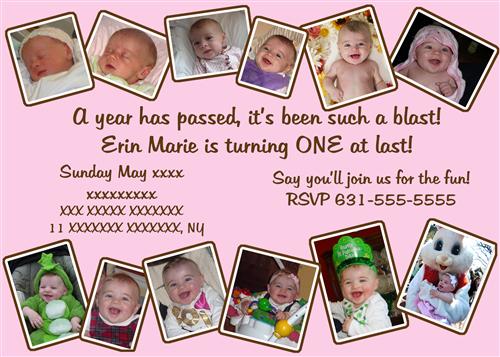
OK so here are the changes I've made so far. I put the white boxes around the pics and I moved to text to line up better with the "poem". I tried moving the date to the other side but it just didn't read well (IMO). And I just can't figure out how to do the box around the invite. Assuming I'll get that done, is there anything else missing? It still looks kind of blah to me but I don't know what else to do. I tried brown and white overlapping polka dots and it was just too busy.
Message edited 4/8/2010 8:07:51 PM.
|
| Posted 4/8/10 7:28 PM |
| |
|
brownie
Baby #1 is here!
Member since 11/08 13903 total posts
Name:
|
Re: Opinions on this 1st b-day invite
I love it! 
|
| Posted 4/8/10 7:49 PM |
| |
|
BigB
C & J are 10!

Member since 6/05 5914 total posts
Name:
Stacey
|
Re: Opinions on this 1st b-day invite
Good job! It looks great!
|
| Posted 4/8/10 8:01 PM |
| |
|
dawnygirl25
Growing up soo fast..

Member since 1/06 14917 total posts
Name:
Dawn
|
Re: Opinions on this 1st b-day invite
love it!
|
| Posted 4/8/10 8:01 PM |
| |
|
pharmcat2000
Mom of 2 + 1
Member since 10/05 7395 total posts
Name:
Catherine
|
Re: Opinions on this 1st b-day invite
Sorry...I had to take down the revised copy...I left all the info in.
|
| Posted 4/8/10 8:09 PM |
| |
|
julz33
i run for bacon

Member since 5/05 20584 total posts
Name:
julz
|
Re: Opinions on this 1st b-day invite
You should add her name somewhere on it
|
| Posted 4/8/10 9:45 PM |
| |
|
ChrisDee
My Girls

Member since 11/06 9543 total posts
Name:
Christine
|
Re: Opinions on this 1st b-day invite
Posted by julz33
You should add her name somewhere on it
I second that!
|
| Posted 4/8/10 10:06 PM |
| |
|
pharmcat2000
Mom of 2 + 1
Member since 10/05 7395 total posts
Name:
Catherine
|
Re: Opinions on this 1st b-day invite
Here is a revised copy. I put a brown box around the white ones also, to try to tie in the brown from the text since I couldn't get a box around the whole invite. Is it too much? Should I leave it just white?
Any other suggestions? I want to order them today.
|
| Posted 4/9/10 12:41 PM |
| |
|
twinkletoes807
Mommy's Girls! ♥

Member since 11/07 10116 total posts
Name:
Gabi
|
Re: Opinions on this 1st b-day invite - changes made
I know this is an older post but I just wanted to tell you that I love the updated version!
|
| Posted 4/19/10 8:49 AM |
| |
|