

Can anyone explain how I can make my own
| Posted By | Message |
|---|---|
|
Can anyone explain how I can make my own digital embellishments? I'm thinking a special program is needed, but I can't afford an expensive one. And, also, I'm wondering exactly what a Cricut does, and is it easy to learn? Thanks!!!! Mary |
|
Posted 12/28/10 5:26 PM 
|
|
|
Long Island Weddings
Long Island's Largest Bridal Resource
| |
|
Re: Can anyone explain how I can make my own I have no idea how to make digital embellishments but there are tons of them available online for free and for sale. I have seen some cute kits on Two Peas in a Bucket. |
|
|
Posted 12/29/10 11:44 AM
|
|
|
Re: Can anyone explain how I can make my own Posted by Christine I have no idea how to make digital embellishments but there are tons of them available online for free and for sale. I have seen some cute kits on Two Peas in a Bucket. The cricut is a die cut machine. You put a cartridge in the machine (there's dozens to choose from), select the file you want to print (a guide book is provided), choose the size (there's a dial on the front of the machine), load the paper then push the cut button. It's so simple. Oh, ok, the Cricut does sound simple. Thanks, Christine!!! Mary |
|
|
Posted 12/29/10 12:01 PM
|
|
|
Re: Can anyone explain how I can make my own do you mean creating actual digital files..you would need a program like paintshop, photoshop, or illustrator. paintshop is the cheapest version of these. |
|
|
Posted 1/6/11 10:29 AM
|
|
|
Re: Can anyone explain how I can make my own I make my digital scrapbooking elements in photoshop. Or sometimes i just scan in obects like ribbon or paperclips |
|
|
Posted 1/16/11 1:36 PM
|
|
|
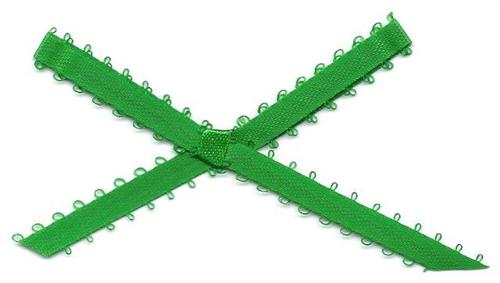
Re: Can anyone explain how I can make my own Hi, Diana and Danielle!!! Appreciate the info!!!! I have tried scanning ribbon, which works if I have a straight ribbon. I can crop the excess white off, but this doesn't work when I scan a bow. I get a white block around it. How do I isolate the object? Thanks!!!! Mary Message edited 2011-01-17 00:19:58.030000. |
|
|
Posted 1/17/11 12:13 AM
|
|
|
Re: Can anyone explain how I can make my own what program do you have to edit pictures. you should be able to make it a transparent background, or isolate the white and delete it. you can send it to me via FM and i can try to remove it. |
|
|
Posted 1/19/11 7:22 PM
|
|
|
Re: Can anyone explain how I can make my own Posted by Peainapod what program do you have to edit pictures. you should be able to make it a transparent background, or isolate the white and delete it. you can send it to me via FM and i can try to remove it. or FM for my email and i'll try to remove it.  Diana, thanks, guess what?!!!! I figured it out!!!! I have a trim tool on my Hallmark Card Studio, and I figured out how to use it!!!!  But with the ribbon above, being that it's thin/has those loops, I think it would make it easier to trim, if I scan a larger/non-loop ribbon, to get a cleaner graphic!!! This requires a lot of patience and a steady hand!!!! Thanks!!!!!  Mary |
|
|
Posted 1/20/11 2:20 PM
|
|
|
Re: Can anyone explain how I can make my own Posted by Danyell48 I make my digital scrapbooking elements in photoshop. Or sometimes i just scan in obects like ribbon or paperclips Hi, Danielle!!! Thanks!!! I'll try to scan other items, and see what happens!!! Any ideas, other than p. clips/ribbon? Mary |
|
|
Posted 1/20/11 2:23 PM
|
|
|
Re: Can anyone explain how I can make my own Posted by debidonnamom Posted by Danyell48 I make my digital scrapbooking elements in photoshop. Or sometimes i just scan in obects like ribbon or paperclips Hi, Danielle!!! Thanks!!! I'll try to scan other items, and see what happens!!! Any ideas, other than p. clips/ribbon? Mary buttons? pieces of patterned fabrics? |
|
|
Posted 1/21/11 10:44 AM
|
|
|
Re: Can anyone explain how I can make my own Posted by Peainapod Posted by debidonnamom Posted by Danyell48 I make my digital scrapbooking elements in photoshop. Or sometimes i just scan in obects like ribbon or paperclips Hi, Danielle!!! Thanks!!! I'll try to scan other items, and see what happens!!! Any ideas, other than p. clips/ribbon? Mary buttons? pieces of patterned fabrics? Oooo, I didn't think of patterned fabric!!!!! How cool is that?!!! Thanks so much, Diana!!!!  I was up all night, doing digital scrapbook pages!!!! I use a lot of graphics from Pixel Scrapper which use to be called Pixeled Memories. There are tons of graphics on this site!!! Mary http://www.pixelscrapper.com/ Message edited 2011-02-21 12:30:47.467000. |
|
|
Posted 1/21/11 1:52 PM
|
|


Potentially Related Topics:
| Topic | Posted By | Started | Replies | Forum |
|---|---|---|---|---|
| Can you please explain some abbreviations not in the lingo? | waterspout4 | 5/9/06 | 3 | TTC |
| How do you explain to a child (race/culture)... | LIMOMx2 | 4/20/06 | 18 | Families Helping Families ™ |
| someone please!!!! explain how a what a good chart looks like?? | nancygrace | 3/25/06 | 5 | TTC |
| can someone please explain the new ice skating scoring system? | Jax430 | 2/11/06 | 2 | Families Helping Families ™ |
| I could really use some hugs right now if anyone is around-- editted to explain some of what happened | justthe4ofus | 12/29/05 | 46 | Parenting |
| How do you explain baby making to a child who doesnt speak English>???? | aliciahelene | 9/30/05 | 14 | Families Helping Families ™ |