| Posted By |
Message |
debidonnamom
Kindness matters

Member since 12/10 1903 total posts
Name:
Mary (MOB)
|
Can anyone explain how I can make my own
digital embellishments? I'm thinking a special program is needed, but I can't afford an expensive one. And, also, I'm wondering exactly what a Cricut does, and is it easy to learn? Thanks!!!! Mary
|
Posted 12/28/10 5:26 PM  |
| |
|
Long Island Weddings
Long Island's Largest Bridal Resource |
Christine
2nd verse same as the 1st

Member since 5/05 15287 total posts
Name:
|
Re: Can anyone explain how I can make my own
I have no idea how to make digital embellishments but there are tons of them available online for free and for sale. I have seen some cute kits on Two Peas in a Bucket.
The cricut is a die cut machine. You put a cartridge in the machine (there's dozens to choose from), select the file you want to print (a guide book is provided), choose the size (there's a dial on the front of the machine), load the paper then push the cut button. It's so simple.
|
| Posted 12/29/10 11:44 AM |
| |
|
debidonnamom
Kindness matters
Member since 12/10 1903 total posts
Name:
Mary (MOB)
|
Re: Can anyone explain how I can make my own
Posted by Christine
I have no idea how to make digital embellishments but there are tons of them available online for free and for sale. I have seen some cute kits on Two Peas in a Bucket.
The cricut is a die cut machine. You put a cartridge in the machine (there's dozens to choose from), select the file you want to print (a guide book is provided), choose the size (there's a dial on the front of the machine), load the paper then push the cut button. It's so simple.
Oh, ok, the Cricut does sound simple. Thanks, Christine!!! Mary
|
| Posted 12/29/10 12:01 PM |
| |
|
Peainapod
Peanuts are here!
Member since 1/09 13591 total posts
Name:
Diana
|
Re: Can anyone explain how I can make my own
do you mean creating actual digital files..you would need a program like paintshop, photoshop, or illustrator. paintshop is the cheapest version of these.
if you want premade stuff to printout try:
mygrafico.com
http://www.scrapbook-elements.com/sbe/
both are fun sites to get art from.
|
| Posted 1/6/11 10:29 AM |
| |
|
Danyell48
LIF Toddler
Member since 6/09 391 total posts
Name:
Danielle
|
Re: Can anyone explain how I can make my own
I make my digital scrapbooking elements in photoshop. Or sometimes i just scan in obects like ribbon or paperclips
|
| Posted 1/16/11 1:36 PM |
| |
|
debidonnamom
Kindness matters
Member since 12/10 1903 total posts
Name:
Mary (MOB)
|
Re: Can anyone explain how I can make my own
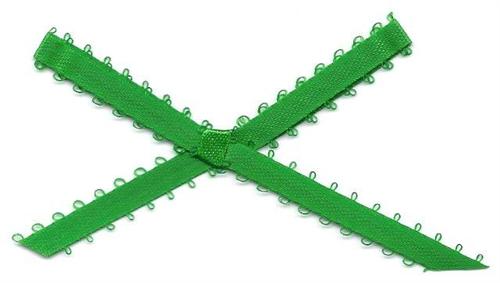
Hi, Diana and Danielle!!! Appreciate the info!!!! I have tried scanning ribbon, which works if I have a straight ribbon. I can crop the excess white off, but this doesn't work when I scan a bow. I get a white block around it. How do I isolate the object? Thanks!!!! Mary
Here's the bow I scanned.
Message edited 1/17/2011 12:19:58 AM.
|
| Posted 1/17/11 12:13 AM |
| |
|
Peainapod
Peanuts are here!
Member since 1/09 13591 total posts
Name:
Diana
|
Re: Can anyone explain how I can make my own
what program do you have to edit pictures. you should be able to make it a transparent background, or isolate the white and delete it. you can send it to me via FM and i can try to remove it.
or FM for my email and i'll try to remove it.
|
| Posted 1/19/11 7:22 PM |
| |
|
debidonnamom
Kindness matters
Member since 12/10 1903 total posts
Name:
Mary (MOB)
|
Re: Can anyone explain how I can make my own
Posted by Peainapod
what program do you have to edit pictures. you should be able to make it a transparent background, or isolate the white and delete it. you can send it to me via FM and i can try to remove it.
or FM for my email and i'll try to remove it.
 Diana, thanks, guess what?!!!! I figured it out!!!! I have a trim tool on my Hallmark Card Studio, and I figured out how to use it!!!! Diana, thanks, guess what?!!!! I figured it out!!!! I have a trim tool on my Hallmark Card Studio, and I figured out how to use it!!!!  But with the ribbon above, being that it's thin/has those loops, I think it would make it easier to trim, if I scan a larger/non-loop ribbon, to get a cleaner graphic!!! This requires a lot of patience and a steady hand!!!! Thanks!!!!! But with the ribbon above, being that it's thin/has those loops, I think it would make it easier to trim, if I scan a larger/non-loop ribbon, to get a cleaner graphic!!! This requires a lot of patience and a steady hand!!!! Thanks!!!!!  Mary Mary
|
| Posted 1/20/11 2:20 PM |
| |
|
debidonnamom
Kindness matters
Member since 12/10 1903 total posts
Name:
Mary (MOB)
|
Re: Can anyone explain how I can make my own
Posted by Danyell48
I make my digital scrapbooking elements in photoshop. Or sometimes i just scan in obects like ribbon or paperclips
Hi, Danielle!!! Thanks!!! I'll try to scan other items, and see what happens!!! Any ideas, other than p. clips/ribbon? Mary
|
| Posted 1/20/11 2:23 PM |
| |
|
Peainapod
Peanuts are here!
Member since 1/09 13591 total posts
Name:
Diana
|
Re: Can anyone explain how I can make my own
Posted by debidonnamom
Posted by Danyell48
I make my digital scrapbooking elements in photoshop. Or sometimes i just scan in obects like ribbon or paperclips
Hi, Danielle!!! Thanks!!! I'll try to scan other items, and see what happens!!! Any ideas, other than p. clips/ribbon? Mary
buttons? pieces of patterned fabrics?
|
| Posted 1/21/11 10:44 AM |
| |
|
debidonnamom
Kindness matters
Member since 12/10 1903 total posts
Name:
Mary (MOB)
|
Re: Can anyone explain how I can make my own
Posted by Peainapod
Posted by debidonnamom
Posted by Danyell48
I make my digital scrapbooking elements in photoshop. Or sometimes i just scan in obects like ribbon or paperclips
Hi, Danielle!!! Thanks!!! I'll try to scan other items, and see what happens!!! Any ideas, other than p. clips/ribbon? Mary
buttons? pieces of patterned fabrics?
Oooo, I didn't think of patterned fabric!!!!! How cool is that?!!! Thanks so much, Diana!!!!  I was up all night, doing digital scrapbook pages!!!! I use a lot of graphics from Pixel Scrapper which use to be called Pixeled Memories. There are tons of graphics on this site!!! Mary I was up all night, doing digital scrapbook pages!!!! I use a lot of graphics from Pixel Scrapper which use to be called Pixeled Memories. There are tons of graphics on this site!!! Mary
http://www.pixelscrapper.com/
Message edited 2/21/2011 12:30:47 PM.
|
| Posted 1/21/11 1:52 PM |
| |
|