| Posted By |
Message |
pharmcat2000
Mom of 2 + 1
Member since 10/05 7395 total posts
Name:
Catherine
|
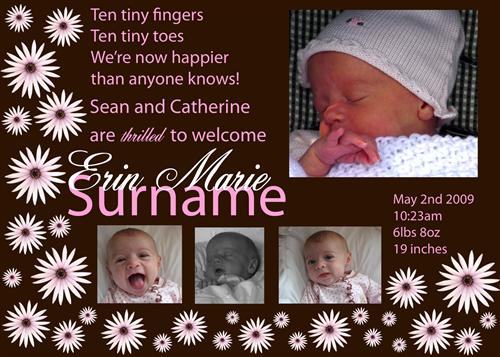
My first Photoshop project - birth announcement
Critiques? Suggestions?
TIA!
Message edited 8/21/2009 9:20:03 PM.
|
Posted 8/21/09 9:12 PM  |
| |
|
Long Island Weddings
Long Island's Largest Bridal Resource |
Stefanie
♥

Member since 5/05 23599 total posts
Name:
Stefanie
|
Re: My first Photoshop project
I'm being EXTREMELY critical... 
The 3 pictures on the bottom have to line up. Do you see how the 2nd pic and the 3rd pic don't line up with the first? I would also make the pictures bigger and take out the flowers on the bottom. Just have the flowers going down the left side of the invite. This way it won't take away from the pics.
I would also use the first picture as the main big picture...it's so cute!!
I think you did an awesome job with your first invite!!!
|
| Posted 8/21/09 9:21 PM |
| |
|
bonitachyc
big sister status may 2012!!

Member since 5/08 3242 total posts
Name:
Lupe
|
Re: My first Photoshop project - birth announcement
how adorable!!great job mama!!
|
| Posted 8/21/09 9:24 PM |
| |
|
pharmcat2000
Mom of 2 + 1
Member since 10/05 7395 total posts
Name:
Catherine
|
Re: My first Photoshop project - birth announcement
Posted by Stefanie
I'm being EXTREMELY critical...
The 3 pictures on the bottom have to line up. Do you see how the 2nd pic and the 3rd pic don't line up with the first? I would also make the pictures bigger and take out the flowers on the bottom. Just have the flowers going down the left side of the invite. This way it won't take away from the pics.
I would also use the first picture as the main big picture...it's so cute!!
I think you did an awesome job with your first invite!!!
I noticed that too about the 3 pics. I think it is because of how they were cropped. If I just change the height of the last 2 pics will it skew the image and distort it? I did my best to just line up the bottoms of the pics.
Also, since it is a birth announcement, is it ok to have a pic of her smiling as the main picture, since she obviously wasn't smiling early on. I just waited so long to do them that now she is smiling.
|
| Posted 8/21/09 9:26 PM |
| |
|
NinaLemon
It's a boy!!!

Member since 10/07 6453 total posts
Name:
Jeannine
|
Re: My first Photoshop project - birth announcement
I think it is gorgeous!
I also agree with the previous poster that the three bottom pictures should line up. I would probably make them all the same size ....but I may be a bit OCD, LOL
and easy way to help you line them up is to use guides. Have your ruler turned on and click in the ruler area and then drag into the picture plane. a blue line with appear, this is a guide that you can snap to.
Also if you want to be sure to have the images the same size you can set you selection tool to a fixed size (the size you want the image) move it over the section you want to keep, then select inverse and delete the rest of the image (if you use this method each image has to be on it's own layer).
I really like your composition! Great Job!
|
| Posted 8/21/09 9:31 PM |
| |
|
Michelle1123
Baby #5 on the way!

Member since 9/05 7919 total posts
Name:
|
Re: My first Photoshop project - birth announcement
It's very cute! I would remove some of the flowers....thats what my eyes went to first. You want eyes to go right to the big picture. And I think you should use the first small one as the big one.
VERY good for your first try! 
|
| Posted 8/21/09 9:31 PM |
| |
|
Lauren82
LIF Adult
Member since 10/06 4580 total posts
Name:
L
|
Re: My first Photoshop project - birth announcement
I totally love it! I am very jealous of your skills at Photoshop! My only suggestion would be maybe adding your other child's name in some way...Otherwise, I do think its perfect!
|
| Posted 8/21/09 9:31 PM |
| |
|
Michelle1123
Baby #5 on the way!
Member since 9/05 7919 total posts
Name:
|
Re: My first Photoshop project - birth announcement
Oh, and I think the text on the right hand side should not start above the small photos but be in line as if it was another photo, does that make sense?
|
| Posted 8/21/09 9:34 PM |
| |
|
Stefanie
♥
Member since 5/05 23599 total posts
Name:
Stefanie
|
Re: My first Photoshop project - birth announcement
Sometimes it does distort the pic but if you drag the corner of the pic when making it bigger, you can enlarge the height and the width at the same time...make sure the height and width numbers are close to being identical.
I don't think people are going to think that about the smiling pic. I love it. It should be highlighted as the first picture because it's the first thing people are going to see when they open it.
|
| Posted 8/21/09 9:34 PM |
| |
|
NinaLemon
It's a boy!!!
Member since 10/07 6453 total posts
Name:
Jeannine
|
Re: My first Photoshop project - birth announcement
Posted by pharmcat2000
I noticed that too about the 3 pics. I think it is because of how they were cropped. If I just change the height of the last 2 pics will it skew the image and distort it? I did my best to just line up the bottoms of the pics.
Also, since it is a birth announcement, is it ok to have a pic of her smiling as the main picture, since she obviously wasn't smiling early on. I just waited so long to do them that now she is smiling.
If you want to keep the same proportions when you scale, hold down the shift key as you drag the corner of the box OR click the chain symbol near the height and width boxes. If the symbol appears broken the ratio can change (distorting your image)
|
| Posted 8/21/09 9:38 PM |
| |
|
pharmcat2000
Mom of 2 + 1
Member since 10/05 7395 total posts
Name:
Catherine
|
Re: My first Photoshop project - birth announcement
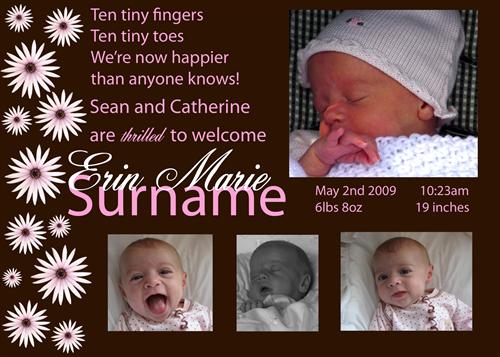
Is this better?
|
| Posted 8/21/09 9:44 PM |
| |
|
Stefanie
♥
Member since 5/05 23599 total posts
Name:
Stefanie
|
Re: My first Photoshop project - birth announcement
SO much better with less flowers.
Make the pic on the right a bit smaller to line up the 3.
Bring down the birth info a bit.
|
| Posted 8/21/09 9:47 PM |
| |
|
headoverheels
s'il vous plaît

Member since 6/07 42079 total posts
Name:
LB
|
Re: My first Photoshop project - birth announcement
Posted by Stefanie
SO much better with less flowers.
Make the pic on the right a bit smaller to line up the 3.
Bring down the birth info a bit.
i agree except for bringing down the birth info - it's lined up with her name now and i like that.
great job! it looks fantastic!
ETA: i am a dope - it's not lined up exactly. is that what you meant Stef?
Message edited 8/21/2009 10:06:14 PM.
|
| Posted 8/21/09 10:05 PM |
| |
|
pharmcat2000
Mom of 2 + 1
Member since 10/05 7395 total posts
Name:
Catherine
|
Re: My first Photoshop project - birth announcement
Posted by Stefanie
SO much better with less flowers.
Make the pic on the right a bit smaller to line up the 3.
Bring down the birth info a bit.
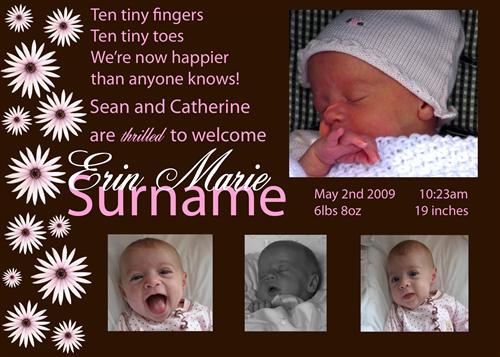
I made these changes and it does look better. I also tried making the 3 pics on the bottom bigger, so there was less brown background underneath them but then they come close to the size of the 1 big pic on the top. Is that bad? Or should I leave them small?
I also tried changing the pics and making the first small pic the main one on top but it didn't look right to me -- too many sleeping pictures together on the bottom.
Message edited 8/21/2009 10:26:18 PM.
|
| Posted 8/21/09 10:18 PM |
| |
|
jennyal
LIF Adult

Member since 8/07 1430 total posts
Name:
|
Re: My first Photoshop project - birth announcement
LOVE her smiling pic!!!
|
| Posted 8/21/09 10:27 PM |
| |
|
smdl
I love Gary too..on a plate!
Member since 5/06 32461 total posts
Name:
me
|
Re: My first Photoshop project - birth announcement
I would only change the middle pic of the small pic. It looks Black and White and the others are color pics.
|
| Posted 8/21/09 10:28 PM |
| |
|
pharmcat2000
Mom of 2 + 1
Member since 10/05 7395 total posts
Name:
Catherine
|
Re: My first Photoshop project - birth announcement
Posted by smdl
I would only change the middle pic of the small pic. It looks Black and White and the others are color pics.
I changed it to B&W because the background of that one is very different than the other 2 and she is wearing a pink and green striped outfit and I thought it would look bad, being so different. Does it look bad having the contrast of the B&W with the color pics?
|
| Posted 8/21/09 10:32 PM |
| |
|
Stefanie
♥
Member since 5/05 23599 total posts
Name:
Stefanie
|
Re: My first Photoshop project - birth announcement
Posted by pharmcat2000
Posted by Stefanie
SO much better with less flowers.
Make the pic on the right a bit smaller to line up the 3.
Bring down the birth info a bit.
I made these changes and it does look better. I also tried making the 3 pics on the bottom bigger, so there was less brown background underneath them but then they come close to the size of the 1 big pic on the top. Is that bad? Or should I leave them small?
I also tried changing the pics and making the first small pic the main one on top but it didn't look right to me -- too many sleeping pictures together on the bottom.
IMAGE
PERFECT!!!!!!!!!!!!!!!!!
|
| Posted 8/22/09 12:21 PM |
| |
|
CouponKT
Our family is complete

Member since 6/06 16494 total posts
Name:
K
|
Re: My first Photoshop project - birth announcement
my only input is that the word "thrilled" is smooshed and a little hard to read.
Adorable overall though - I LOVE the design!
|
| Posted 8/22/09 12:31 PM |
| |
|
mikeswife06
Drama Momma

Member since 9/06 9947 total posts
Name:
Anne
|
Re: My first Photoshop project - birth announcement
Love the one you fixed!!!!!!!!! Perfect!
|
| Posted 8/22/09 12:57 PM |
| |
|